Client work
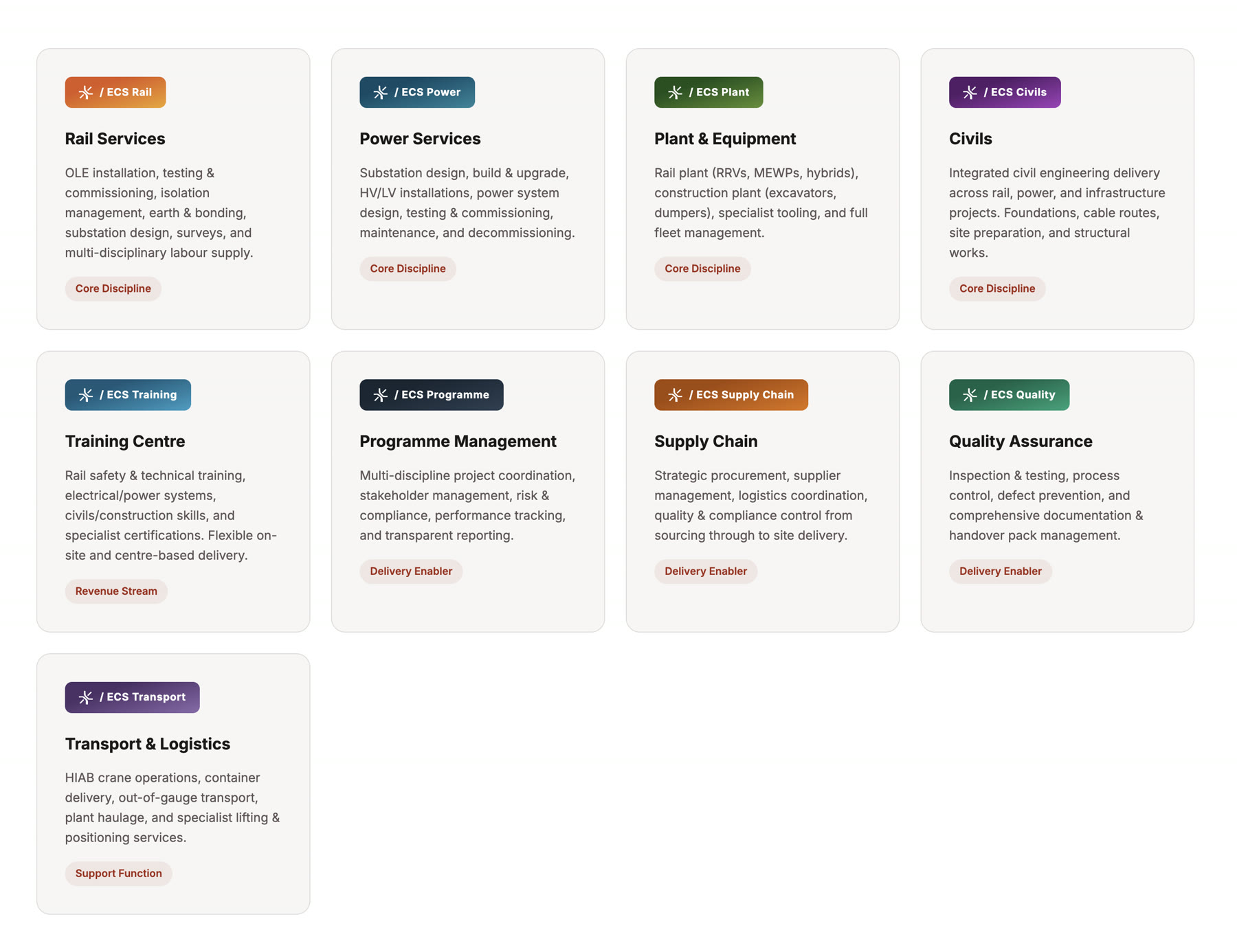
ECS Group deliver rail, power, civils, plant, training and programme management across UK infrastructure. Nine service areas, each with its own scheduling, reporting and tracking tools, and almost nothing shared between them. Big S designed and built ECS Command, a single platform to replace that estate.
The Problem
The problems were the ones that follow fragmentation. Progress updates, quality inspections and compliance documentation were paper-heavy or spreadsheet-driven, then re-keyed back at the office. Plant utilisation was invisible, so kit sat idle on one site while another hired in. Certification lapses surfaced late. Assembling a quality record for a client meant hunting through folders and inboxes.

The Solution
ECS Command covers all nine areas as integrated modules on one platform, with role-based access so an operative, a supervisor and a client each get their own view. Site work is captured once, on a phone, offline if there is no signal, and flows straight into the record. Quality packs assemble themselves.
The architecture is deliberately contract-first: an OpenAPI specification and shared design tokens sit between a Flutter mobile app, a Vue 3 web app and a FastAPI backend, so the three stay in step. It runs on AWS, provisioned with Terraform. With the operational data finally in one place, the platform can predict bottlenecks and possession overrun risk rather than simply record them after the fact.
What the platform does
One Platform, Nine Modules
ECS Group runs rail, power, plant, civils, training, procurement and quality as separate disciplines, each with its own tools. ECS Command puts all nine on one platform with role-based access, so each module works on its own but shares the same data.
- Project Hub: programme, milestones, dependencies
- Workforce & Competency
- Plant & Asset Management
- Safety & Isolation
- Supply Chain, Quality, Training, Commercial, ESG
- 01Project Hub
- 02Workforce
- 03Plant & Assets
- 04Safety & Isolation
- 05Supply Chain
- 06Quality
- 07Training
- 08Commercial
- 09ESG
Digital Site Packs
Site paperwork (pre-work briefings, isolation certificates, plant inspections, quality hold points) was paper and spreadsheet driven, then re-typed back at the office. It is now captured once on site, offline if there is no signal, and assembled into the record automatically.
- Structured forms from JSON Schema templates
- Works offline, syncs when signal returns
- Photos and sign-off captured in place
- Quality records assembled automatically
- PDF and Excel export for the client
- Pre-work briefing signed
- Isolation certificate
- Plant inspection
- Quality hold point
- Site photos & sign-off
Plant and Asset Visibility
Utilisation was a blind spot: plant sat idle on one site while another hired in. Assets are now tracked with live location, inspection status and utilisation, so allocation is a decision rather than a guess.
- Live asset register and location
- Utilisation reporting by site and week
- Inspection and certification status
- Off-hire prompts for idle plant
Competency and Compliance
PTS cards, medicals and course completions were tracked in spreadsheets, so lapses surfaced late. Certifications are now held against each person with automatic expiry alerts, and the training centre books straight into the same records.
- PTS and certification tracking
- Automatic expiry alerts
- Course booking and completion records
- Digital ID cards with QR verification
- Client-ready compliance evidence
- PTSTrack team AValid to Mar 27
- MedicalJ. WardExpires in 22 days
- COSSR. HughesExpires in 9 days
- Plant ticketYard crewValid to Nov 26
AI Where It Earns Its Place
Once the operational data is in one place, it can be worked on. The platform flags likely bottlenecks before they land, predicts possession overrun risk, and surfaces the certification and resourcing problems that would otherwise be found the week they bite.
- Predictive schedule analysis
- Automatic bottleneck detection
- Possession overrun risk scoring
- Document search over site records
- Transcription of site notes and briefings
- Possession overrun risk: 68%
- 3 certifications expiring in 30 days
- Reallocate 2 RRVs from Wk 45
The app on site
The web platform is where work is planned and reviewed. The Flutter app is where it actually happens: an operative opens a work pack, signs on to the briefing, completes the check sheet and captures the site diary from a phone, in a cutting, with no signal.
Everything is captured once and syncs when the phone reaches coverage, so nothing is re-keyed back at the office and the record assembles itself.
- Work packs and shift documents
- Staff sign-on and briefings
- Quality check sheets
- Defects and close calls
- Site diaries with photos
- Drawings and document library
- Digital competency cards
- Hours and fatigue tracking
And more
Everything else it needed
Client Portal
Stakeholder-facing views so clients see progress and quality records without a weekly email round-up.
Multi-Client Structure
Separate client workspaces with their own templates, branding and access rules.
Expiry Alerts
Certifications, medicals and inspections tracked to date and flagged before they lapse.
ESG Reporting
Carbon, waste and social-value data captured as work happens rather than reconstructed at year end.
Design Tokens
A shared token set in the contracts package keeps the Flutter app and the Vue web app visually identical.
Role-Based Access
Operative, supervisor, administrator and client roles, each seeing only their part of the platform.
Under the bonnet
How it was built
Mobile
- Flutter, iOS and Android
- Offline-first capture
- Background sync
Web
- Vue 3 with Pinia
- TanStack Query
- Leaflet mapping
- PDF.js document viewer
- Typed client from OpenAPI
API
- FastAPI on Python 3.12
- Pydantic v2
- SQLAlchemy 2 and Alembic
- PostgreSQL and Redis
- OpenAPI contract first
AI & documents
- pgvector similarity search
- Self-hosted speech-to-text
- PDF and Excel generation
- JSON Schema form templates
Infrastructure
- AWS via Terraform
- ECS Fargate containers
- RDS Postgres, ElastiCache
- CloudFront and S3
- Auth0 authentication
Engineering
- Monorepo, shared contracts
- Docker Compose locally
- Structured logging
- Sentry error tracking
Nine service areas, nine modules, one platform, replacing the spreadsheets and paper packs that ran between them.
Services provided
- Product design
- UX/UI design
- Platform architecture
- Flutter mobile app
- Vue 3 front-end build
- Python API development
- Cloud infrastructure
- AI & automation
- Multi-tenant architecture
- Reporting & analytics
Next project


Got something like this in mind?
We build products end to end — discovery, design, engineering and the AI that makes them worth using. Tell us what you are trying to solve.